
[Mis à jour en 2025]
Where do CAPTCHAs stand in 2025?
Since 2024, CAPTCHAs have been evolving in the face of AI capable of getting around traditional systems. New CAPTCHAs have appeared: visual illusions (IllusionCAPTCHA), video transitions (BounTCHA), or CAPTCHAs generated by AI. But bypass techniques are progressing just as fast: automated agents that imitate human clicks, AI models that solve the puzzles, or fake CAPTCHAs used to spread malicious software.
Cloudflare Turnstile: an alternative to CAPTCHAs
One player is emerging as an alternative to traditional CAPTCHAs: Cloudflare Turnstile. Unlike Google’s reCAPTCHA, it no longer relies on visual puzzles to solve or on advertising analysis of users’ behavior.
The aim is to offer a smooth experience for internet users, while effectively blocking the majority of bots.

How does Cloudflare Turnstile work?
Turnstile integrates easily into any website and performs detection in the background, without displaying puzzles on screen.
It combines several signals (browser configuration, IP address reputation, light traffic analysis) to determine whether the user is human, without intrusive data collection.
Another advantage: it can be linked directly to Cloudflare’s web application firewall (WAF), which strengthens the overall security of a site.
The result: no images to click, no time wasted.
Why use Cloudflare Turnstile?
- Respect for privacy: Cloudflare states that it does not use Turnstile for advertising purposes, unlike Google reCAPTCHA.
- Simple integration: Turnstile integrates directly into a website, without redirection to a third-party service.
- Reinforced security: being natively coupled with the Cloudflare WAF, it adds bot detection and application protection.
European alternatives
Note that Turnstile is an American solution. For companies that prefer to rely on European tools, there are, for example, FriendlyCaptcha or TrustCaptcha, which we have already deployed for the website of one of our clients.


Both are German solutions. Their strengths: respect for privacy, smooth use, independence from Google and compliance with the GDPR.
The GDPR requires that the personal data of Europeans be protected and, in principle, hosted in the EU or in a country recognized as offering an equivalent level of protection.
American companies are subject to the CLOUD Act (a US law that can require data to be handed over to US authorities), which directly conflicts with the GDPR.
How should you make your choice?
Today’s CAPTCHAs are evolving along two lines:
–Raw performance, with Google reCAPTCHA: effective and high-performing, but based on the collection of personal data.
–Respect for privacy and data protection, with European solutions such as FriendlyCaptcha or TrustCaptcha, which guarantee the protection of your data and GDPR compliance.
In short, choosing a CAPTCHA is a strategic choice, and each organization must define its priorities.
Our role at h2a, as a communication agency, is to support this choice, explain the stakes and guide you towards the solution that combines security, user experience and meets your objectives.
A reminder: what is a CAPTCHA?
When you want to send a contact form on a website, you are asked to verify that you are not a robot but a real person genuinely wishing to contact the company behind the form.
But why is this step necessary, and is it really useful?
The company that owns the website wants to make sure you are not a robot, meaning a script or a malicious program that might try to compromise the security of the site.

Examples:
- Spam: spammers could use the contact form to send messages en masse. This can flood the recipient’s inbox, make handling legitimate requests more difficult and harm the user experience.
- Brute-force attacks: hackers could use brute-force attacks (repeated successive attempts) to try to guess a user’s login details or email addresses by trying different combinations. This can lead to compromised accounts and security breaches.
CAPTCHA = Completely Automated Public Turing test to tell Computers and Humans Apart
Literally, a CAPTCHA is a reverse Turing test.
The Turing test (described by Turing himself in the 1950s) consists of pitting a human against a machine on one side and another human on the other. The aim is to try to tell the human from the machine: if this is not possible, then the machine is considered capable of thinking.
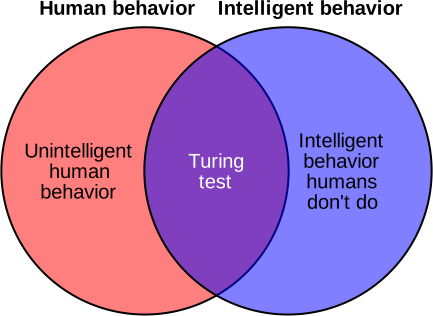
The concept of the CAPTCHA rests on distinguishing machines from humans, based on abilities specific to humans that machines could, in theory, never acquire.

In the example above, the test confronts the machine with something it does not know: semantic logic, namely at what point one word ends and another begins.
In theory, all of this works, or at least, it used to work.
Ways of bypassing CAPTCHAs
Use of deep learning techniques
These CAPTCHAs, which worked well until the 2010s, are now obsolete. To get around them, it is possible to create a script that performs “denoising” on the image, then separates the characters from one another, and that is that.
With deep learning techniques, these scripts have even come to achieve better CAPTCHA-solving scores than humans.
(admit it, you have sometimes asked for a refresh of the CAPTCHA because you could not read it?)
Questions written out in full > ask ChatGPT
Simple CAPTCHAs, consisting of a question written out in full, typically “What is two plus two?”, were until recently widely used to secure forums. They were simple to set up and effective: robots can solve maths problems, but only with digits.
But they had not counted on a certain ChatGPT…
ChatGPT being programmed to answer questions, nothing could be simpler!
Free labor for Google?
Google takes advantage of the use of its CAPTCHAs by a large number of people to train its artificial intelligence and also to digitize documents.
In 2006, when the digitization programme was launched, it was estimated that 200 million CAPTCHAs were deciphered every day, enough to quickly carry out simple operations, such as word separation, typically the kind of problem posed when an algorithm cannot automatically decipher a word.
Text CAPTCHAs have thus helped digitize the archives of the New York Times, as well as the Google Books library.
In the example below, the second word is taken from a work to be digitized. Character recognition algorithms having their limits, some terms could not be deciphered automatically, which is where human intervention is needed.
CAPTCHAs featuring numbers, meanwhile, helped improve Google Street View by identifying house numbers and road signs.
Today, Google’s CAPTCHAs are used to improve image recognition programmes, in particular to train the AI of self-driving vehicles. This is why you are sometimes asked to click on images of traffic lights, bicycles, and so on.
Are CAPTCHAs really useless?
From what we have seen so far, CAPTCHAs are far from infallible… and have mostly been used for other activities, such as improving Google’s tools.
However, since the first versions, these tests have evolved considerably and have led to major advances.
And that is precisely the point: the very purpose of a security test is to be bypassed, and that is the goal behind CAPTCHAs, according to IBM researchers working on the subject.
The more a security measure is bypassed, the more it must be improved, and the more it leads to interesting discoveries.
Are there other security techniques?
Google’s next-generation CAPTCHA
The latest version of Google’s reCAPTCHA is now invisible: it analyzes the user’s behavior while they browse. It combines machine learning to enable advanced risk analysis.
This version is not appreciated in terms of data protection, since we do not really know to what extent it analyzes users’ behavior: we know that cookies are used, as well as mouse movements and possibly other elements (you have to accept the same terms of use as for other Google services to install this reCAPTCHA).
The honeypot
You read that right: it is the honey pot technique, like the one used to catch insects.

In practice, in the context of a contact form, this technique protects against automated spam submissions and malicious robots. The method exploits the fact that bots cannot distinguish between form fields that are visible and invisible to human users.
In practice, here is how the honeypot works:
- A hidden field is added to the form
- It is named in such a way that robots will consider it genuine
- A server-side rule checks whether this field is filled in or not
- The right treatment is applied if the field is filled in: the form is rejected; if the field is not filled in, the form can be considered legitimate.
The advantage of using a honeypot is that it requires no action from the visitor, which is attractive from a user experience standpoint. Human users do not see the hidden field and do not need to take any additional action, while malicious robots are quickly identified and blocked.
Generally speaking, even though zero risk does not exist, it is preferable to secure a form on a website, whether with a CAPTCHA, a honeypot or any other technique that cannot be circumvented by a robot.